Category Archives: Technology

Review: Silicon Mechanics

After some hilariously frightening reactions from Dell support to simple problems, and HP becoming aggressively competitive on price, we’ve been using HP servers for a few years now. The hardware is good, and the support, while reasonable, always… pauses… when I mention that we’re running Debian. I try not to let it slip if I don’t have to.

We put in some HP blades a couple of years ago, and I was annoyed to discover that they have discontinued that enclosure and all the blades in it. I decided this was a good time to look at their newer options, as well as at other companies.

Back in July, I had noticed a Silicon Mechanics booth at OSCon. I noticed their slogan “experts included.” That sounds great; we’ve got software experts here, but not hardware experts, and I’d enjoy dealing with a company that knows more about their hardware than I do. I went up to their booth and asked what they’d say about us running Debian on their hardware. “That would be just fine.” “So you’d fully support it when I’m running Debian?” “Sure.” “What about management software – do you have any of that which I’d find annoying to port to Debian?” “Our servers don’t need any management software other than what comes with your kernel.” Good answers.

So, when it came time for us to decide what to do about getting a new server in here, I figured I’d call up Silicon Mechanics and see what they’d recommend. They put me on a conference call with a sales rep and an IT engineer, and wound up recommending a 1U server for us to start with, and an iSCSI storage device to address some of the storage needs we have (both for that server and others). I had heard of iSCSI only vaguely, and asked how it worked, and what the performance would be like compared to our 2Gb FC SAN. I got back intelligent (and correct) answers.

They probably spent 2 hours with me on the phone before we placed an order. I was incredibly happy with their service, level of expertise, and helpfulness. They even did a webinar to demo the management interface on the storage unit for me.

Today, the 1U server arrived. I unboxed it and set it on my desk to configure. First item: set an IP address for the IPMI card. That’s the device that lets me connect to it over a web browser and interact with the console, power cycle it, etc. as if I was there. I set an IP, but somehow couldn’t seem to figure out the username and password for the web interface.

So I called Silicon Mechanics support at the number that was included on the fridge magnet (!) that came with the shipment. Phone rang once. Then a live, capable American answered. No menus, no fuss. I asked my question. He apologized, saying, “I should know that, but I’ll have to look it up… hold on just a bit.” I had my answer about 90 seconds later. He offered to send me the full docs for the IPMI card if I wanted as well.

So I’ve been very impressed with them so far. From what I’ve heard, their iSCSI enclosure ought to be quite something as well. They even helped us spec out a switch that supports trunking for use with it.

I’ll give them a “highly recommended”.
Looking back at WordPress

I’ve hosted this blog on three different platforms: Drupal, WordPress, and at present, Serendipity.

Back in 2006, I rejected WordPress, noting that most of its plugins were incompatible with the current version, its main anti-spam software wasn’t Free, there was no central plugin directory. And, while WordPress supported PostgreSQL, many plugins didn’t.

Serendipity, at the time, had none of those problems.

However, I’ve been having other problems with Serendipity since then. People have repeatedly had trouble with captchas. The RSS feeds have long had subtle incompatibilities with certain aggregators, leading to duplicate posts.

I’m looking back at WordPress now. It looks like it is a lot more mature than it was 2.5 years ago. Perhaps it’s time to switch back.

I hope it will support PostgreSQL better now, but I note that its website seems to list MySQL only these days. Ah well, can’t have it all, I guess.

Search for Backup Tools

Since the last time I went looking for backup software, I’ve still be using rdiff-backup.

It’s nice, except for one thing: it always keeps an uncompressed copy of your current state on the disk. This is becoming increasingly annoying.

I did some tests with dar and BackupPC, and both saved considerable disk space over rdiff-backup. The problem with dar, or compressed full/incrementals with tar, is that eventually you have to make a new full backup. You have to do that, *then* delete all your old fulls and incrementals, so there will be times when you have to store a full backup twice.

The hardlinking approach sounds good. It’s got a few problems, too. One is that it can lose metadata about, ironically enough, hard links. Another is that few of the hard linking programs offer a compressed on-disk format. Here’s what I’ve been looking at:

BackupPC

Nice on the service. I’m a bit annoyed that it’s web-driven rather than commandline-driven, but I can look past that. I can also look past that it won’t let me clamp down on ssh access as much as I’d like.

BackupPC writes metadata to disk alongside files, so it can restore hard links, symlinks, device entries, and the like. It also has the nice feature of being able to hard link identical files across machines, so if you’re backing up /usr on a bunch of machines and have the same files installed, you save space. Nice.

BackupPC also can compress the files on your disk. It uses pre-compression md5sums for identifying files to hard link, which is nice.

Here’s where I get nervous.

BackupPC doesn’t just use regular compression, from say gzip or bzip2. It uses its own low-level algorithm centered around the Perl deflate library. And it does it in a nonstandard way owing to a supposed memory issue with zlib. Why they don’t just pipe it through gzip or equivalent is beyond me.

This means that, first off, it’s using a nonstandard compression format, which makes me nervous to begin with. If that weren’t annoying enough, you have to install Perl plus a bunch of modules to extract the thing. This makes me nervous too.

Dirvish

Doesn’t support compression.

faubackup

Doesn’t support compression.

rdup

Supports compression and encryption. Does not preserve ownership of things unless the destination filesystem does (meaning you must run as root to store your backups.)

Killer lack of feature: it does not preserve knowledge about what was hardlinked on the source system, so when you restore your backup, all hardlinks are lost. Epic fail.

rsnapshot

Doesn’t support compression.

StoreBackup

Does support compression, appears to restore metadata in a sane way. Supports backing up to a different machine on the LAN, but only if you set up NFS. Looks inappropriate for doing backups over VPN. Comprehensive, though confusing, manual. Looks like an oddball design with an oddball manual.

So, any suggestions?

Crazy Cursor Conspiracy Finally Fully Fixed

So lately I had the bad fortune to type in apt-get install gnome-control-center on my workstation. It pulled in probably a hundred dependencies, but I confirmed installing it, never really looking at that list.

The next day, I had a reason to reboot. When I logged back in, I noticed that my beloved standard X11 cursors had been replaced by some ugly antialiased white cursor theme. I felt as if XP had inched closer to taking over my machine.

I grepped all over $HOME for some indication of what happened. I played with the cursor settings in gnome-control-center’s appearance thing, which didn’t appear to have any effect. When I logged out, I noticed that the cursor was messed up in kdm of all things, and no amount of restarting it could fix it.

After some grepping in /etc, I realized that I could fix it with this command:

update-alternatives –config x-cursor-theme

And I set it back to /etc/X11/cursors/core.theme. Ahh, happiness restored.

I guess that’ll teach me to install bits of gnome on my box. Maybe.

New version of datapacker

I wrote before about datapacker, but I didn’t really describe what it is or how it’s different from other similar programs.

So, here’s the basic problem the other day. I have a bunch of photos spanning nearly 20 years stored on my disk. I wanted to burn almost all of them to DVDs. I can craft rules with find(1) to select the photos I want, and then I need to split them up into individual DVDs. There are a number of tools that did that, but not quite powerful enough for what I want.

When you think about splitting things up like this, there are a lot of ways you can split things. Do you want to absolutely minimize the number of DVDs? Or do you keep things in a sorted order, and just start a new DVD when the first one fills up? Maybe you are adding an index to the first DVD, and need a different size for it.

Well, datapacker 1.0.1 can solve all of these problems. As its manpage states, “datapacker is a tool in the traditional Unix style; it can be used in pipes and call other tools.” datapacker accepts lists of files to work on as command-line parameters, piped in from find, piped in from find -print0. It can also output its results in various parser-friendly formats, call other programs directly in a manner similar to find -exec, or create hardlink or symlink forests for ease of burning to DVD (or whatever you’ll be doing with it).

So, what I did was this:


find Pictures -type f -and -not -iwholename "Pictures/2001/*.tif" -and \
-not -wholename "Pictures/Tabor/*" -print0 | \
datapacker -0Dp -s 4g --sort -a hardlink -b ~/bins/%03d -

So I generate a list of photos to process with find. Then datapacker is told to read the list of files to process in a null-separated way (-0), generate bins that mimic the source directory structure (-D), organize into bins preserving order (-p), use a 4GB size per bin (-s 4g), sort the input prior to processing (–sort), create hardlinks for the files (-a hardlink), and then name the bins with a 3-digit number under ~/bins, and finally, read the list of files from stdin (-). By using –sort and -p, the output will be sorted by year (Pictures/2000, Pictures/2001, etc), so that photos from all years aren’t all mixed in on the discs.

This generates 13 DVD-sized bins in a couple of seconds. A simple for loop then can use mkisofs or growisofs to burn them.

The datapacker manpage also contains an example for calling mkisofs directly for each bin, generating ISOs without even an intermediate hardlink forest.

So, when I wrote about datapacker last time, people asked how it differed from other tools. Many of them had different purposes in mind. So I’m not trying to say one tool or the other is better, just highlighting differences. Most of these appear to not have anything like datapacker –deep-links.

gaffiter: No xargs-convenient output, no option to pass results directly to shell commands. Far more complex source (1671 lines vs. 228 lines)

dirsplit: Park of mkisofs package. Uses a random iterative approach, few options.

packcd: Similar packing algorithm options, but few input/input options. No ability to read a large file list from stdin. Could have issues with command line length.

Switched from KDE to xmonad

Within the last couple of days, I’ve started using xmonad, a tiling window manager, instead of KDE. Tiling window managers automatically position most windows on your screen, freeing you from having to move, rearrange, and resize them all the time. It sounds scary at first, but it turns out to be incredibly nice and efficient. There are some nice videos and testimonials at the xmonad homepage.

I’ve switched all the devices I use frequently to xmonad. That includes everything from my 9.1″ Eee (1024×600) to my 24″ workstation at work (1920×1200). I’ve only been using it for 2 days, but already I feel more productive. Also my wrist feels happier because I have almost completely eliminated the need to use a mouse.

xmonad simultaneously feels shiny and modern, and old school. It is perfectly usable as your main interface. Mod-p brings up a dmenu-based quick program launcher, keyboard-oriented of course. No more opening up terminals to launch programs, or worse, having to use the mouse to navigate a menu for them.

There’s a lot of documentation available for xmonad, including an “about xmonad” document, a guided tour, and a step-by-step guide to configuring xmonad that I wrote up.

I’ve been using KDE for at least 8 years now, if not more. WindowMaker, fvwm2, fvwm, etc. before that. This is my first step with tiling window managers, and I like it. You can, of course, use xmonad with KDE. Or you can go “old school” and set up a status bar and tray yourself, as I’ve done. KDE seems quite superfluous when xmonad is in use. I think I’ve replaced a gig of KDE software with a 2MB window manager. Whee!

Take a look at xmonad. If you like the keyboard or the shell, you’ll be hooked.

Command-Line RSS Reader

So, does anybody know of a command-line RSS reader? I want something that will save state and output recent entries in a nicely parsable manner. Maybe URL\tTitle\tDecscription\n or somesuch.

So here’s why I’m asking.

I got to thinking that it might be nice to automatically post to Twitter when I’ve got a new blog post up, rather than manually have to say “just wrote a blog post.”

Then I also got to thinking that when I see an interesting URL that I’m going to Twitter about, I’m also almost always adding it as a bookmark to Delicious. Why not make a fortwitter tag on Delicious, and automatically post my comments about them to Twitter, saving me having to do it twice?

So I’ve got Twidge that can be nicely used in a shell script to do this stuff. I’m hoping to avoid having to write a shell script-friendly RSS aggregator. But I’m just prone to do it if nobody else has already, though I’d really like to avoid reinventing the wheel.

New Twitter Client: Twidge

I’ve lately been thinking about Twitter. I wanted some way to quickly post tweets from the command line. But I also wanted to be able to receive them in a non-intrusive way on all my machines. And I wanted to work with Twitter and Identi.ca both.

Nothing quite existed to do that, so I wrote Twidge.

Twidge is a command-line Twitter client. It can be run quite nicely interactively, with output piped through less. Or you can run it as a unidirectional or bidirectional mail gateway. Or you can use its parser-friendly output options to integrate it with shell scripts or other programs.

It’s got an 11-page manual (which is also its manpage). User-friendly in the best tradition of command line programs.

And it’s released today. The source packages include the debian/ directory for you to use for building them, but I’ve also posted an i386 binary that runs on etch and sid on my webpage, until it gets out of NEW.

See the homepage for more info.

Oh, it’s written in Haskell, by the way.

Dot-Matrix Teletype Simulator Update and Request for Teletype Info

I recently wrote about wanting to have a teletype. Well, I have since realized that teletypes weigh hundreds of pounds, draw hundreds of watts, and aren’t available on eBay for a reasonable price. Well I knew the hundreds of pounds bit, but still. I pretty well have had to give up on a real teletype.

So, now on to the next best thing: a teletype simulator. Enter the two free dot-matrix printers that found their way to my office earlier this week. One of them even works. I bicycled to the awesome local office supplies store (about 11 miles away) to buy a ribbon for it. This is the place that’s been there since the 1890s. They still stock dot matrix ribbons, typewriter ribbons, and even fanfold paper.

On the project. Linux has its heritage in Unix, which was used with these devices. It can be made to work with them even now. But there’s a trick: teletypes used a bidirectional serial link. Dot matrix printers have no keyboard. So we have to take input from a different device than we send output to.

A simple trick will do for that:

TERM=escpterm telnet localhost > /dev/lp0

Now, here’s the next problem. Dot-matrix printers have a line buffer. They don’t start printing the line at all until they see CR or LF. Makes it annoying for interactive use. So I wrote a quick tool to insert into that pipeline. After a certain timeout after the input stops, it will force the printer to flush its buffer. Took a little while to figure out how to do that, too; turns out there’s a command ESC J that takes an increment for vertical spacing in 1/216 inch, and accepts 0. So I can send \x1BJ\x00 to flush the buffer. I can run it like this:

TERM=escpterm telnet localhost | escpbuf > /dev/lp0

That leaves another problem, though: the printhead is right over the text. (Even though it moves to the right of the printing position, and then moves back left for the next character to print.) I modified the program to roll the paper out a bit, and then reverse feed it to continue printing the line. But that is slow and, I suspect, tough on the stepper motor.

Also, I have crafted a terminfo file for the Epson-compatible dot-matrix printers (which are almost all of them), which can also be found at the above link.

So here’s the question, for anyone that has used a real teletype:

Did the printhead obscure the text there too, or could you see the entire current line at all times?

From Dell, a Uniquely Terrible Experience

Ah, Dell. Seeming inventors of the tech support pit of bureaucratic indifferences, inventors of the flamingo pink Inspiron, perpetrators of fraud in New York…

I have, for over a year now, been on a crusade trying to get them to stop sending me their Dell Home and Home Office catalog to my mailbox. It has been a bundle of fun, let me tell you.

They have a nice-sounding privacy policy. It says you can opt out of all their mailings by filling out a form online. Yeah, good luck with that. First of all, there are different forms for different departments at Dell. I’ve filled out them all, multiple times. They do nothing whatsoever. Perhaps they use them as lists of known-good addresses to send new advertisements to, rather than lists of people to remove. Oh well.

Now, unfortunately I feel compelled to bore you with the saga so far, involving telephone hang-ups, broken privacy policies, and the like. But there is a silver lining at the end, in which I submitted a request to the postal service asking them to block Dell from sending me any more mail, and it appears that they are very likely to violate Federal Law any day now.

I have called them about it. Dealt with the old “let me transfer you to the correct department” then hang up on me ploy. Spoken to people that have promised up and down that I’ll be off their list in 30-60 days. It’s always 30-60 days, isn’t it? Very convenient that I can’t tell for 2 months whether or not they’ve processed my request.

I’ve tried their online chat. One of my attempts went like this:

Session Started with Agent (Sneha Ranga)

Agent (Sneha Ranga): “Due to circumstances that have affected Dell Communications I am temporarily unable to pull up any information. The down time is temporary. We apologize for the inconvenience, as we value your time as a customer. Please contact us back after an hour.”

Session Ended

Ah Dell, only you could reach such a pinnacle of customer service. /kicking someone out of a chat room before they have a chance to say a word.

Finally, last fall, I blogged about the situation (that’s the link above). Debbie from Dell read the post and emailed me. Great, I thought. She asked for my address information and catalog information and sent me a removal confirmation:

From: Debbie@Dell.com
Date: Thu, 18 Oct 2007 13:08:18 -0500
To: jgoerzen@complete.org
Subject: RE: Dell mailing list

Thank you, Mr. Goerzen, your request to have the below address
information removed from our marketing lists has been received:

[ my address here ]

We will process your request promptly. However, it may take several
weeks for some changes to take effect. If you are still receiving
catalogs after thirty (30) days feel free to email me. Sorry for any
inconvenience you may have experienced.

Thank you,
Debbie

So that was October. In December, I replied to that message, saying: “I received another mailing today, and it’s been nearly 2 months since your initial message. If there’s anything further you can do, I’d appreciate it.” Debbie said, “I am very sorry Mr. Goerzen, I will resubmit your request.” Guess how successful that was.

So in February, I manage to figure out a way to send in a support ticket without having a Dell system serial number. I wrote:

I keep getting your Dell Home and Home Office catalog. I have tried for months to get off your mailing list. I have called in, talked to people in multiple departments, who have promised to remove me from the list. I have contacted you online. NOTHING IS HELPING. This has gone on for MONTHS.

PLEASE NEVER SEND ME MAIL AGAIN, EVER, AND DO NOT RENT OR SHARE MY NAME.

My address is above.

The code on the mailing I received is: [ snipped ]

The form letter I got back said:

If you are currently receiving our catalog or mailings and would like to be removed, please visit the following web page and select the appropriate link under the “Opt-out of direct mail, phone or fax communications” heading: http://www.dell.com/OptOut

I replied, saying that form didn’t work. Guess what I got back?

Thank you for signing up for Dell Email Subscriptions. Please save this email for your records.

Yes, that’s right. Asking them to take me off their postal mailing lists got them to PUT ME ON their email lists. ARGH.

So they eventually manage to correctly take me off the email list, and of course promise to do the same with the postal list. This back in February.

I contacted them again in March and July, only to have a similar stupidity-laced run-in with clueless form-answer-laden Dell support reps. Each one claimed to have now, finally, and permanently removed me from the list. It never happened, and none of them lifted a finger to find out way, and no amount of begging could make them.

So, here’s the good part.

Junkbusters has spent years educating people on how to get rid of unwanted mail, and documents getting a prohibitory order against the sender. It was originally designed for people that didn’t want to receive obscene advertising mailings, but thanks to the happy fact that one non-adult-mailer challenged a prohibitory order all the way to the Supreme Court, you can now get prohibitory order against anyone. Yes, even Dell. (The supreme court’s ruling even gave an example: you can prohibit a clothing catalog if you want.)

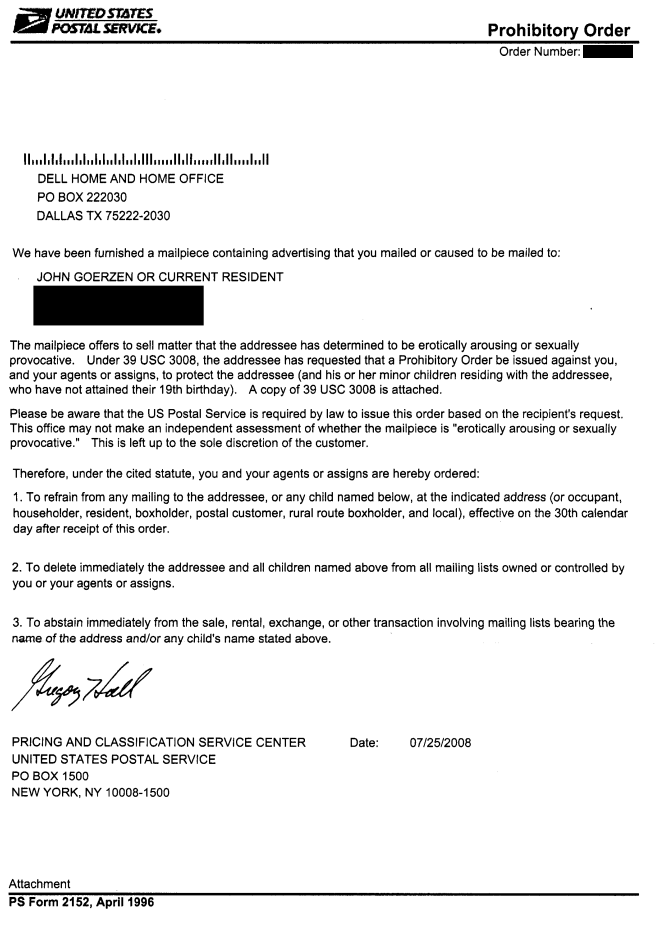
And last month, that’s exactly what I did. The USPS sent me back a copy of the letter they sent to Dell, as well as a second page with instructions on reporting violations. Here’s the letter they sent to Dell:

dell-usps

Somehow I get a chuckle over some Dell mail clerk trying to figure out how an 11-pound laptop is sexually provocative.

From August 25 on, it is a federal offense for Dell to send me another Home and Home Office catalog. This is a branch of criminal law, not civil law. That is, it’s the maybe-go-to-jail branch of law.

How disappointed I was to receive yet another catalog from them today. If only they had waited 5 more days, I could have turned them in now.

Oh well. There’s always next month’s catalog. Let’s just hope the clerk that received the USPS letter removed my name with a better system than everyone else at Dell uses, eh?